5 Best LinkedIn AI Tools for Outreach, Messaging, and Lead Generation

LinkedIn is full of people who could become your next clients, partners, or prospects, but getting their attention takes a lot of time.
If you’ve ever found yourself sending the same message over and over, checking for replies, and wondering why nothing is moving, you’re not alone. LinkedIn AI tools help you maintain an active presence and enhance your LinkedIn presence by automating engagement and profile optimization.
LinkedIn AI tools can simplify this process. These tools are considered essential lead generation tools for professionals looking to attract and convert prospects efficiently.
They help you send connection requests, follow-ups, and personalized messages at scale, so you can spend more time on real conversations and closing deals.
When using automation tools, it's important to comply with LinkedIn's rules to avoid account issues and ensure safe, genuine interactions.
In this guide, you’ll discover the 5 best LinkedIn AI tools that make outreach, messaging, and lead generation faster and more effective.
TL;DR – Top 5 Best LinkedIn AI Tools for Outreach & Lead Generation
- Salesforge - Best for AI-personalized LinkedIn + email outreach, this powerful tool streamlines your outreach and lead generation efforts
- Expandi - Ideal for safe cloud-based LinkedIn automation, making it a powerful lead generation tool
- Snov.io - Best for LinkedIn lead enrichment + email outreach, serving as an effective lead generation tool
- LeadConnect - Great for simple, affordable LinkedIn messaging automation, this lead generation tool helps manage prospects efficiently
- MeetAlfred - Best for multichannel outreach with built-in CRM features, making it a powerful tool for LinkedIn lead generation
What Are LinkedIn AI Tools?
LinkedIn AI tools are a type of automation tool designed to help you automate or improve your outreach on LinkedIn.
These are often referred to as LinkedIn automation tools, as they streamline repetitive tasks such as prospecting, engagement, and messaging.
Instead of messaging people manually, these tools can send connection requests, follow-up messages, and reminders for you. They also assist with content creation, including post writing and helping users create posts that reflect their own voice.
Many of them also use AI to personalize messages, find leads, or organize replies. These tools help users generate content ideas, create content for their LinkedIn profile, and support personal branding and LinkedIn strategy.
The main purpose of LinkedIn AI tools is to save time, scale your outreach, and get more replies. They can also boost LinkedIn engagement through personalized outreach and personalized messaging, increasing visibility and building stronger relationships.
How We Evaluated the Top LinkedIn AI Tools?
Before choosing a tool for outreach or lead generation, it’s important to know what actually matters.
We focused on practical factors that affect how well a tool helps you message prospects, stay safe, and get replies on LinkedIn.
Here’s how we evaluated the top LinkedIn AI tools:
- AI messaging & automation, to make sure the tool can send connection requests, follow-ups, and personalized messages without manual work.
- Safety & compliance, including sending limits, delays, cloud execution, and protection against LinkedIn account restrictions. The best tools follow LinkedIn's guidelines, operate within LinkedIn's limits, and mimic human behavior to avoid detection.
- Lead generation features, such as enrichment, targeting, and outreach steps that help you find and convert prospects, plus integration with CRM tools. We also considered CRM integrations pros, like enhanced automation, data enrichment, and workflow efficiency.
- Multichannel support, to see if you can combine LinkedIn with email or other multiple channels such as Twitter, SMS, or social media for better reply rates.
- Ease of use, including how quickly you can set up campaigns, personalize messages, and manage replies.
- Pricing & scalability, to check whether plans are ideal for solo users, agencies, or sales teams, and to see if team management features are included for collaboration and multi-user access.
Each tool was reviewed based on how well it helps you run outreach at scale, stay within LinkedIn’s limits, and turn connections into leads.
When evaluating, we also looked at key metrics, campaign performance, and advanced analytics to ensure you can track, analyze, and optimize your LinkedIn strategies.
1. Salesforge – Ideal for AI-Personalized LinkedIn & Email Outreach
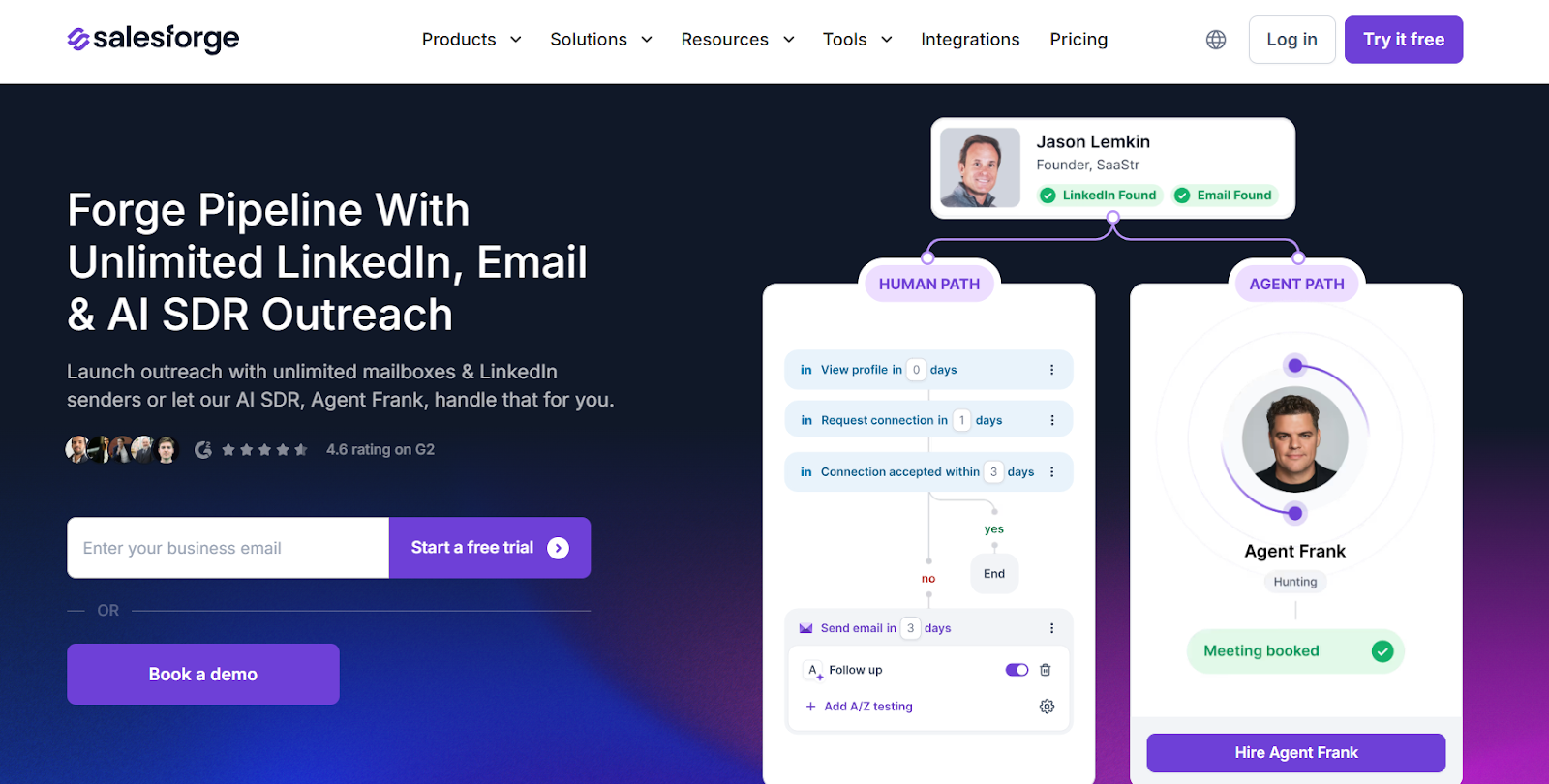
Salesforge is a go to solution and a powerful tool for managing LinkedIn tasks and generating quality leads.
It is an AI-powered outbound platform designed to automate LinkedIn and email outreach at scale.
It helps teams send personalized LinkedIn messages using personalized templates, manage inboxes, warm up mailboxes, and even run outbound operations through AI SDRs and an AI assistant that provides AI assistance for post generation and campaign management.
Salesforge combines multi-channel messaging, AI personalization, warm-up, deliverability monitoring, and infrastructure into one ecosystem built for sales teams and agencies. It helps users connect with potential clients, build valuable LinkedIn connections, and offers deeper insights into campaign performance, including outreach to LinkedIn creators.
Key Features of Salesforge
- Salesforge lets you build multi-channel sequences that combine LinkedIn actions + outbound email inside one workflow.
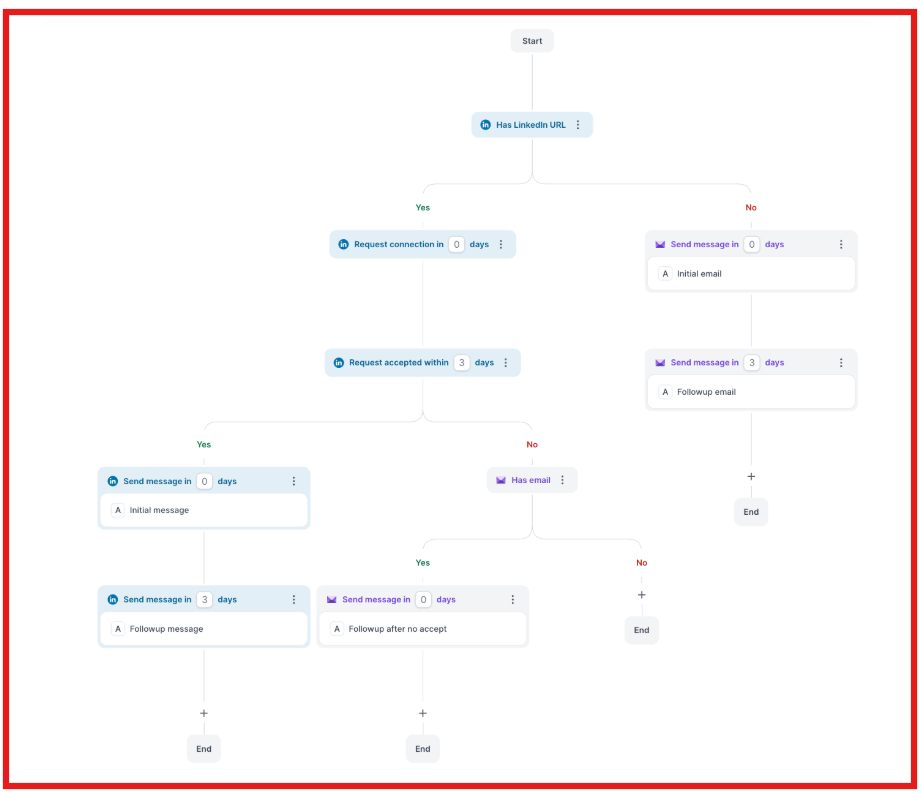
- You can personalize messages using AI trained on buyer and seller data, generating authentic copy based on LinkedIn profiles, websites, or CRM data.
- You can connect unlimited LinkedIn senders and mailboxes without seat-based pricing, making it ideal for agencies and scaling teams.
- Deliverability is protected with Warmforge, email warm-up, placement tests, domain health checks, and mailbox rotation.
- Optional AI SDR (“Agent Frank”) automates prospecting, writing, follow-ups, and booking meetings in multiple languages.
Pros & Cons of Salesforge
Salesforge Pricing
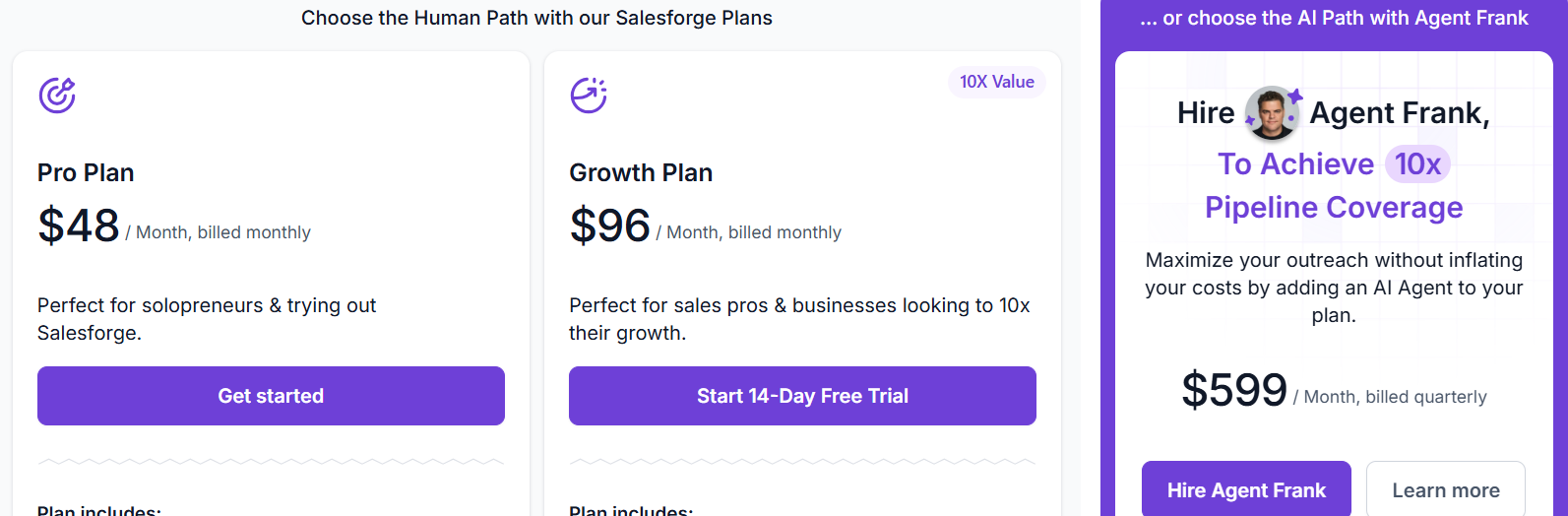
- Free Plan: A free plan is available, allowing users to access core features at no cost before upgrading.
- Pro – $48/month, paid plans start at this level, includes 1,000 active contacts, 5,000 emails/month, unlimited mailboxes, premium warm-up, Primebox unified inbox, sentiment analysis, and live chat support.
- Growth – $96/month, includes everything in Pro + 10,000 active contacts, 50,000 emails/month, unlimited users, unlimited LinkedIn senders, A/B testing, multi-language sequences, API access, priority support, and advanced deliverability settings.
- Agent Frank – $599/month (billed quarterly), AI SDR add-on that handles automated prospecting, messaging, and meeting booking with access to a 500M+ contact search engine, Slack support, and dedicated onboarding.
- Email Infrastructure – Add-On, optional (Mailforge / Infraforge / Primeforge) for domains, mailboxes, SPF/DKIM/DMARC setup, warm-up, placement tests, and deliverability monitoring.
- Free Trial: 14-day trial available for new users with email warm-up and sending capabilities.
2. Expandi – Ideal for Safe LinkedIn Messaging & Multichannel Outreach
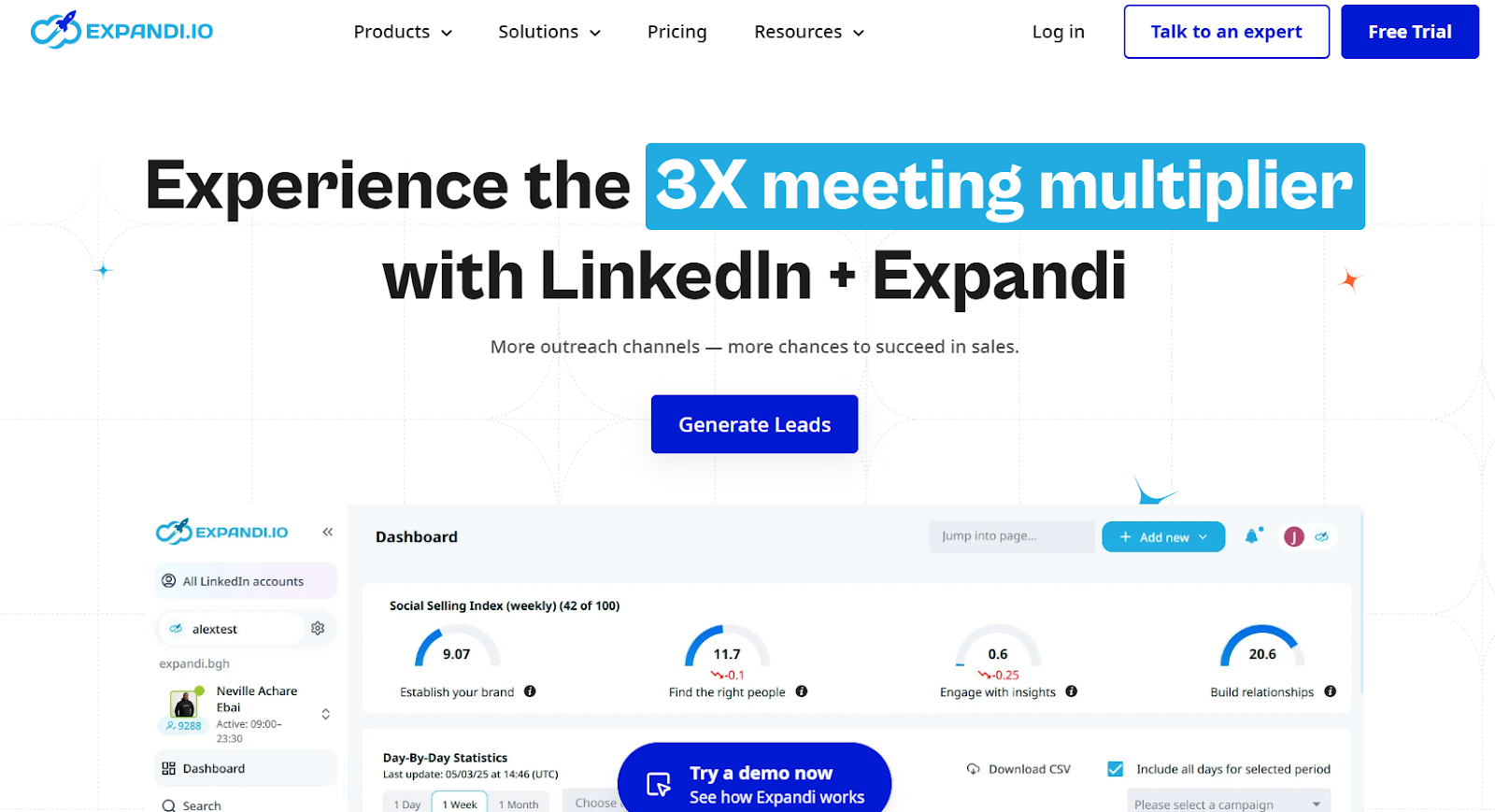
Expandi is a cloud-based LinkedIn automation tool and automation tool built for agencies, sales teams, recruiters, and business owners.
It is designed for safe LinkedIn automation by operating within LinkedIn's limits and mimicking human behavior, helping users comply with LinkedIn's rules and guidelines.
Expandi helps you automate connection requests, follow-ups, and message sequences across LinkedIn and email, while keeping your account safe through smart limits and country-based IPs. It also supports LinkedIn engagement, manages LinkedIn tasks, and enables personalized outreach to boost your networking and lead generation efforts.
If you prefer browser-based functionality, Expandi also offers a chrome extension for seamless integration.
Key Features of Expandi
- Expandi uses dedicated, country-based IP addresses, automatic warm-up, and sending limits to protect your LinkedIn account and reduce the chances of restrictions or bans.
- It allows you to combine LinkedIn actions such as connection requests, profile visits, follows, messages, and InMails with email follow-ups inside a single outreach sequence.
- The platform supports behavior-based smart sequences, so your campaigns can automatically adjust based on actions like “accepted connection,” “opened email,” or “visited profile.”
- Expandi includes image, GIF, and video personalization through third-party integrations, which can increase engagement and reply rates during cold outreach.
Expandi Pricing
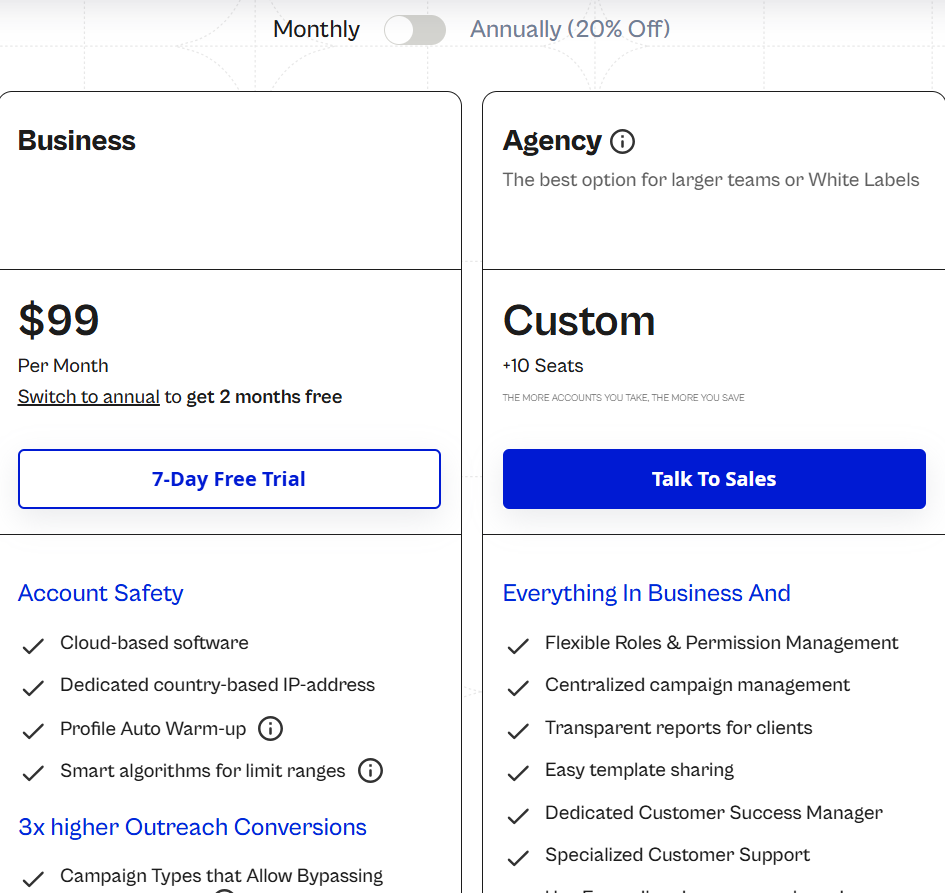
- Free Plan: A free plan is available with limited access to core outreach features.
- Business – $99/month, paid plans start at the Business level and include LinkedIn automation, email outreach, smart sequences, account safety features, analytics, and dedicated IP.
- Agency (10+ seats) – Custom, includes everything in Business plus role permissions, white-label options, centralized reporting, and dedicated customer success support.
- Personalization Add-Ons – Paid, for Sendspark, Hyperise, and GIF/image personalization.
3. Snov.io – Ideal for LinkedIn Lead Finding & Email Outreach
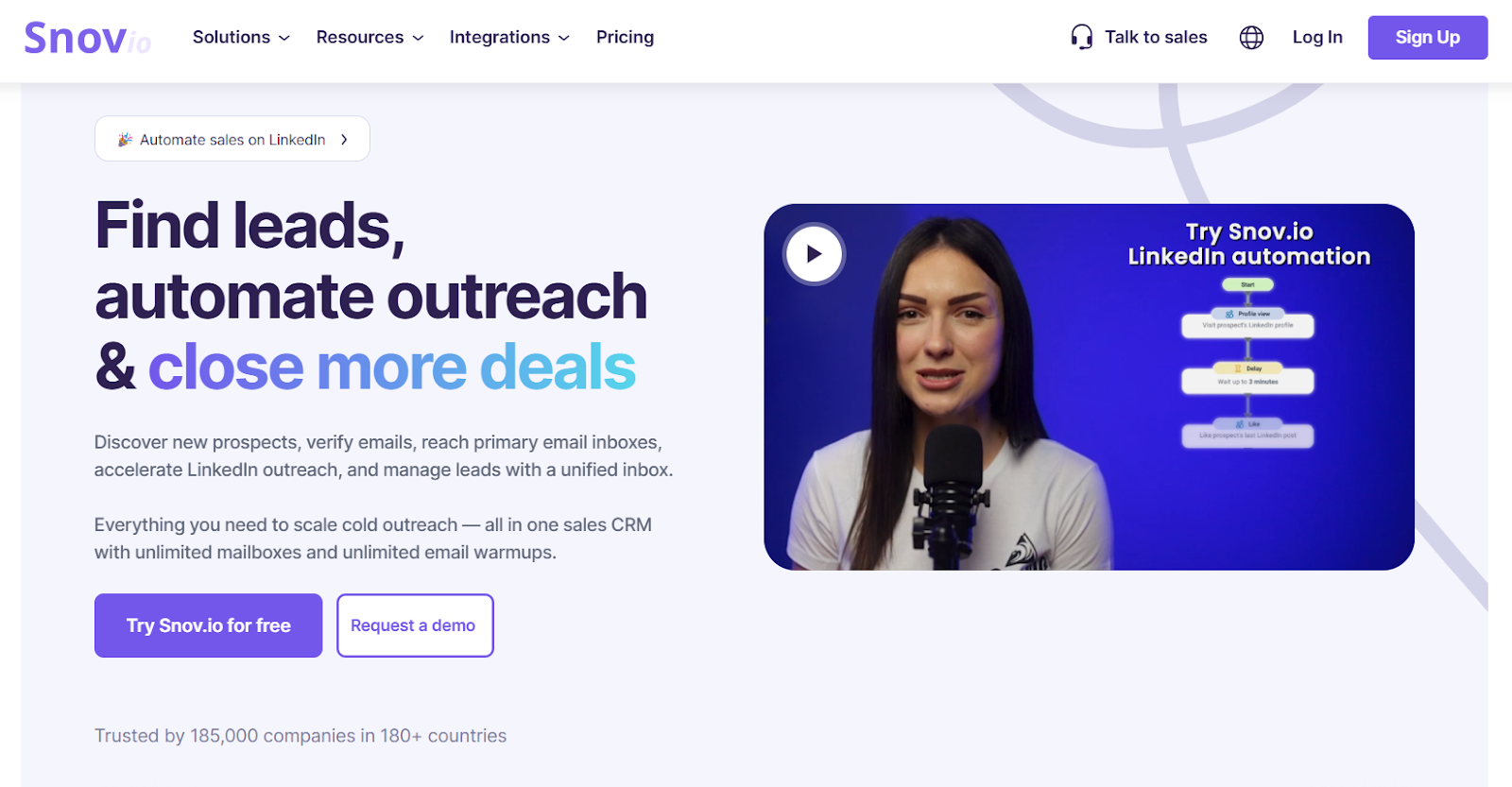
Snov.io is one of the leading lead generation tools for LinkedIn, designed to generate leads, connect with potential clients, and deliver quality leads.
It integrates seamlessly with CRM tools, offering CRM integrations pros such as enhanced automation, data enrichment, and efficient workflow management.
Snov.io helps users optimize their LinkedIn profile, connect with LinkedIn connections, and manage LinkedIn messages for personalized outreach and relationship building.
It helps users collect verified leads from LinkedIn, websites, and databases, then run personalized email and LinkedIn campaigns with built-in deliverability tools and CRM features. Snov.io also offers a Chrome extension, making it easy to automate outreach and manage interactions directly in your browser.
Snov.io brings together lead generation, email verification, multichannel outreach, warm-up, deliverability checks, and CRM to support sales teams, founders, agencies, and recruiters. Compared to other tools, Snov.io helps simplify prospecting through automation and integrated features, streamlining the process of finding and converting prospects.
Key Features of Snov.io
- Snov.io lets you build multi-step campaigns that include LinkedIn actions + email steps in the same sequence for outreach and follow-ups.
- You can find B2B leads from LinkedIn profiles, websites, domains, or a large internal database, then verify emails before outreach to keep bounce rates low.
- Sequences support reply detection and automatically stop sending when a prospect responds through email or LinkedIn.
- Deliverability is supported through inbox warm-up, domain health checks, spam tests, provider matching, and mailbox rotation.
Snov.io Pricing
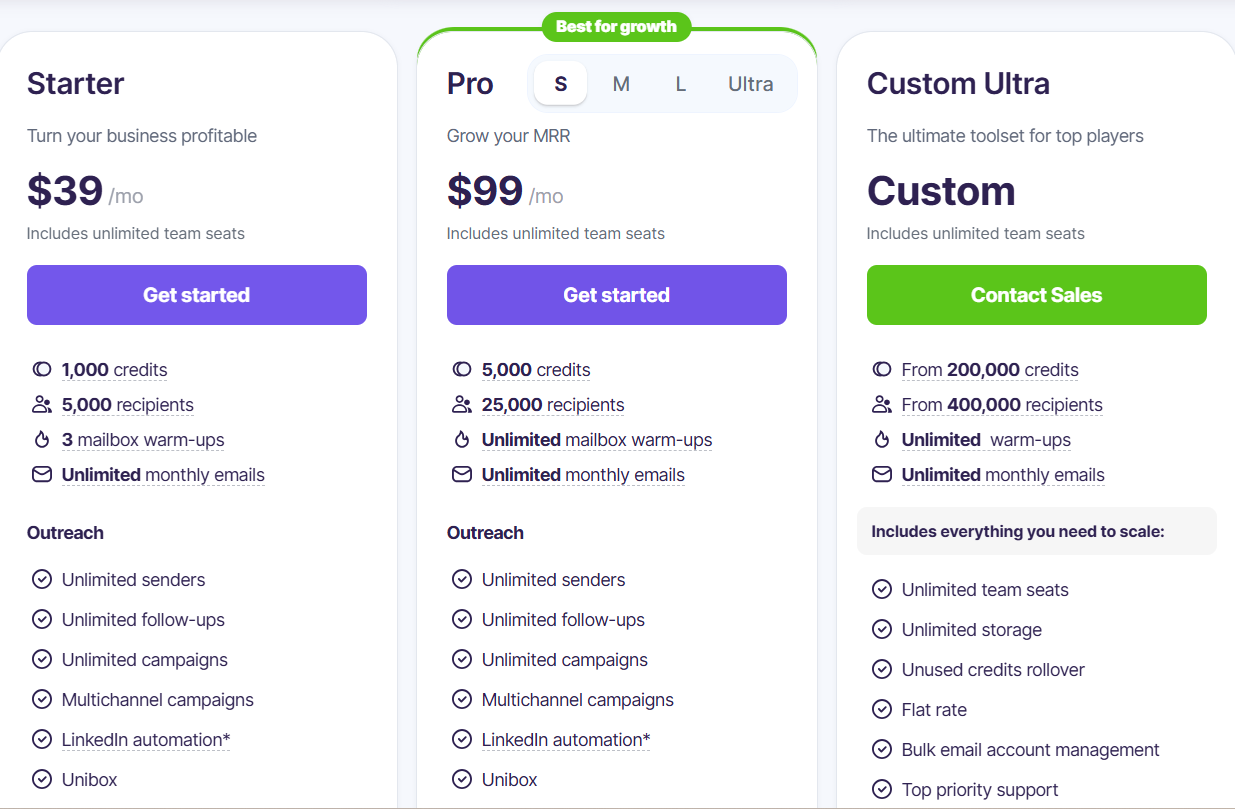
- Free plan available – Access core features at no cost to get started.
- Starter – $39/mo (paid plans start here), 1,000 credits, 5,000 recipients, 3 warm-ups, unlimited emails, team seats, prospecting, verification, deliverability checks, CRM, multichannel outreach.
- Pro – $99/mo, 5,000 credits, 25,000 recipients, unlimited warm-ups, advanced deliverability, sentiment analysis, A/B testing, personalization, campaign controls, team sharing.
- Custom Ultra – Custom, unlimited seats, storage, bulk mailbox management, credit rollover, priority support.
- LinkedIn Automation Add-on – $69/mo per slot, for automated LinkedIn actions.
4. LeadConnect – Ideal for Simple LinkedIn Outreach & Follow-Up Automation
LeadConnect is a LinkedIn outreach automation platform available as a chrome extension, designed to help users automate LinkedIn tasks and manage LinkedIn messages efficiently.
It enables teams to define audiences, send invites, schedule follow-ups, and sync conversations into CRMs like HubSpot for easier lead management.
LeadConnect supports personalized messaging by allowing users to create and use personalized templates for connection requests and follow-ups, making outreach more tailored and effective.
LeadConnect is built for safe LinkedIn automation, operating within LinkedIn's rules, guidelines, and limits by mimicking human behavior to ensure compliance and reduce the risk of account restrictions. The platform also offers team management features for collaboration, multi-user access, and performance tracking, making it suitable for team-based outreach workflows.
Compared to other tools, LeadConnect focuses on LinkedIn-only outreach, offering lightweight automation with message personalization, reply detection, and CRM syncing features that support sales teams, founders, and recruiters.
Key Features of LeadConnect
- LeadConnect lets you automate connection invites and follow-ups on LinkedIn using personalized placeholders (e.g., first name, last name, company name).
- You can define target audiences using LinkedIn Basic Search, Sales Navigator, or CSV uploads, and the tool will use the same search query for automation.
- Sequences support up to 6 follow-up messages after a connection is accepted, with automatic reply detection that stops the sequence when someone responds.
- HubSpot syncing lets you push contacts and message activity into HubSpot with one click, helping teams track leads and nurture deals.
Pros & Cons of LeadConnect
LeadConnect Pricing
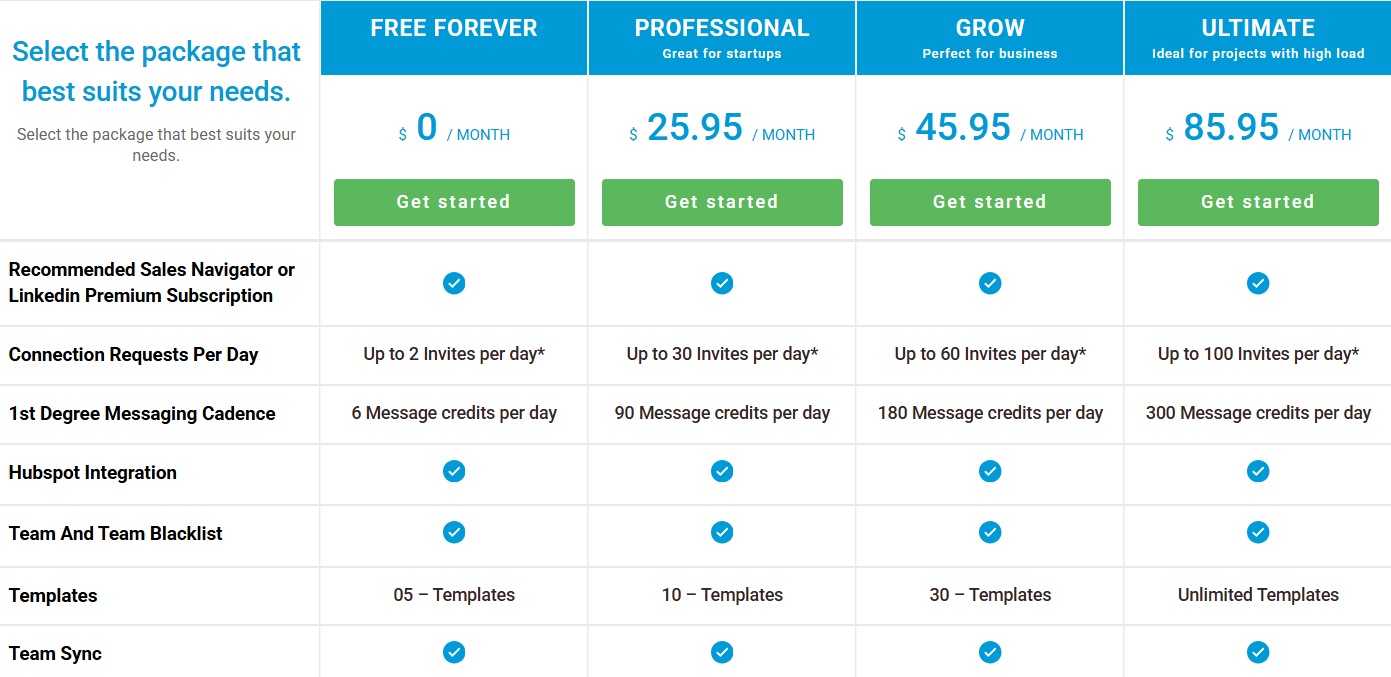
- Free Forever – $0/month, includes up to 2 invites/day and 6 message credits/day with basic templates.
- Professional – $25.95/month, includes up to 30 invites/day, 90 message credits/day, and 10 templates.
- Grow – $45.95/month, includes up to 60 invites/day, 180 message credits/day, email finder integrations, and 30 templates.
- Ultimate – $85.95/month, includes up to 100 invites/day, 300 message credits/day, unlimited templates, HubSpot sync, and full team features.
5. Meet Alfred – Ideal for Multi-Channel LinkedIn Outreach With AI Personalization
Meet Alfred is a cloud-based outreach platform and chrome extension designed for LinkedIn creators and professionals seeking to enhance their LinkedIn presence and personal branding.
It supports content creation with features for post writing, creating posts, generating content ideas, and maintaining your own voice, helping users create high quality content, better posts, and more engaging posts to boost LinkedIn engagement and follower growth.
Meet Alfred's AI assistant provides AI assistance with a powerful post generator, advanced analytics for deeper insights, key metrics, and campaign performance tracking.
The platform enables safe LinkedIn automation by mimicking human behavior, using personalized messaging, personalized templates, and automating LinkedIn tasks such as sending LinkedIn messages, all while complying with LinkedIn's rules, guidelines, and limits.
Team management features allow collaboration and performance tracking for teams, making it easy to manage multi-user outreach workflows.
Compared to other tools, Meet Alfred stands out by supporting a comprehensive LinkedIn strategy and driving LinkedIn growth for individuals and teams looking to optimize their outreach and engagement efforts.
Key Features of Meet Alfred
- Meet Alfred lets you automate LinkedIn outreach at scale, including connection requests, follow-up messages, InMails, group campaigns, event campaigns, and post-engagement outreach.
- You can build multi-channel sequences that combine LinkedIn, email, and Twitter (X) actions in one campaign to increase reply rates and conversions.
- Meet Alfred includes a built-in Lead Finder that uses filters and enrichment to help you discover high-quality prospects and sync them directly into campaigns or CRM systems.
- AI personalization tools support dynamic fields, message templates, automatic greetings, and chained messaging to make automated outreach feel more human.
Pros & Cons of Meet Alfred
Meet Alfred Pricing
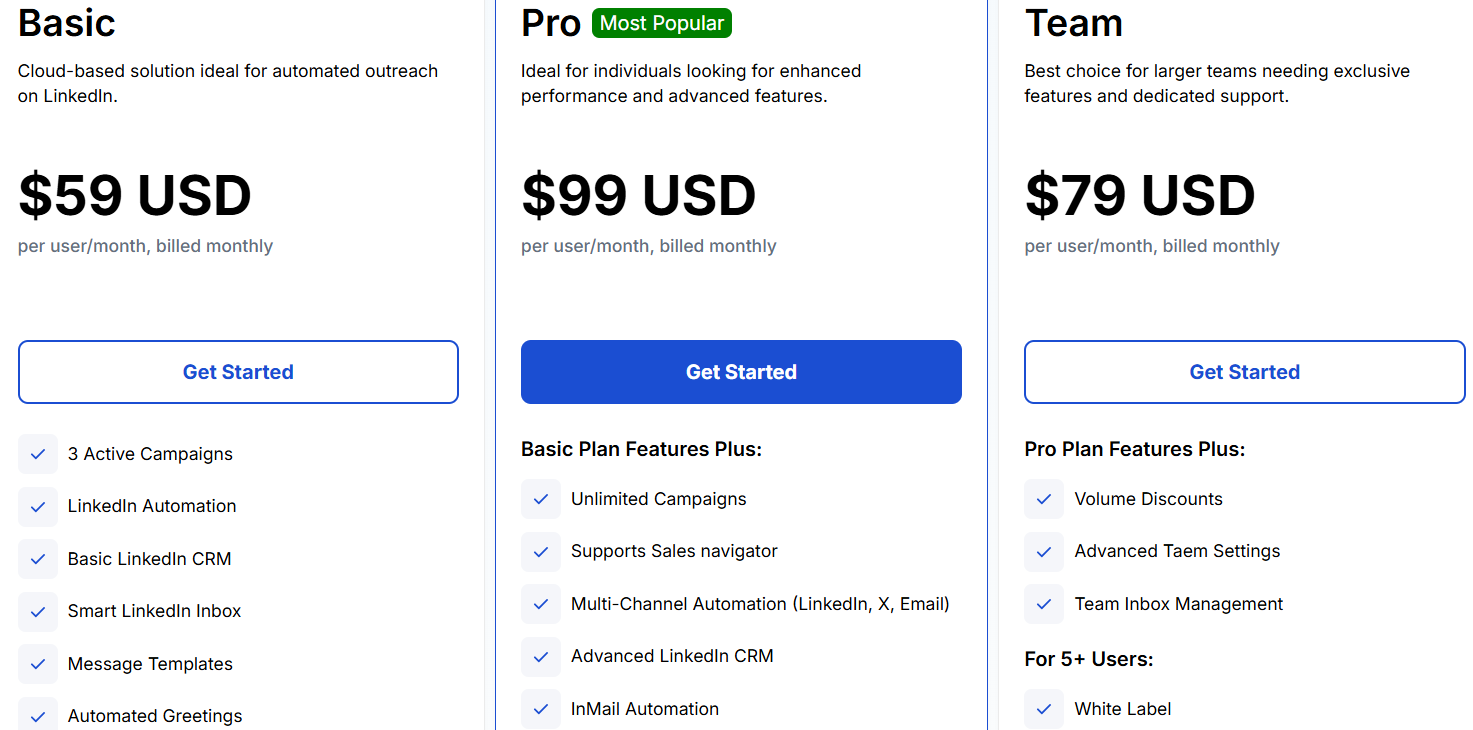
- Free Plan: Meet Alfred offers a free plan with limited features, allowing users to try out core LinkedIn automation tools before upgrading.
- Basic – $59/user/month, paid plans start at the Basic level and include cloud-based LinkedIn automation, basic LinkedIn CRM, LinkedIn inbox, message templates, tagging, notes, and up to 1,000 Lead Finder results.
- Pro – $99/user/month, includes everything in Basic + unlimited campaigns, Sales Navigator support, multi-channel automation (LinkedIn + Email + Twitter), advanced CRM, InMail automation, CSV campaigns, post scheduling, Zapier & webhook integrations, exporting, custom personalization, and up to 5,000 Lead Finder results.
- Team – $79/user/month, includes everything in Pro + volume discounts, advanced team settings, team inbox management, white-label options (5+ users), dedicated account manager (10+ users), priority onboarding, and up to 10,000 Lead Finder results.
Which LinkedIn AI Tool Should You Choose?
LinkedIn AI tools are the go to solution for building a strong LinkedIn presence and executing an effective LinkedIn strategy.
These tools support LinkedIn growth by streamlining content creation, enhancing personal branding, and increasing LinkedIn engagement. They also serve as essential lead generation tools, helping users attract, manage, and convert prospects efficiently.
Choosing the right tool depends on what you need
- If you only want basic LinkedIn invites and follow-ups, simple tools like LeadConnect or Alfred can get the job done.
- If you want safer outreach with daily limits and inbox management, tools like Expandi or Waalaxy are better fits.
- If you need lead finding + team features + reporting, Meet Alfred or Snov.io make more sense.
But if you want to send LinkedIn and email messages together, use AI to personalize at scale, manage replies in one inbox, and keep emails warm, then Salesforge is the strongest choice.
Start your 14-day free trial with Salesforge!
.png)